



Introduction
Minimalist website design is more than just a trend—it’s a strategic approach to creating clean, user-focused websites that deliver results. By emphasizing simplicity, functionality, and aesthetics, this design philosophy removes unnecessary distractions, ensuring your visitors stay focused on what matters most.
In today’s fast-paced digital world, cluttered websites can overwhelm users and drive them away. Minimalist design simplifies the user experience, enhances navigation, and helps websites load faster. Whether you’re running an eCommerce store, a portfolio site, or a business page, minimalist website design offers a powerful way to create a professional, engaging online presence.
This blog explores what minimalist website design is, its benefits, and how you can implement it effectively. By the end, you’ll have actionable tips to create a website that looks great, performs well, and keeps visitors coming back.
What is Minimalist Website Design?
 Minimalist website design is a design philosophy that prioritizes simplicity and functionality. It focuses on eliminating unnecessary elements and emphasizing clarity, usability, and aesthetics. This approach ensures that every part of your website serves a purpose, creating a seamless experience for users.
Key characteristics of minimalist design include:
- Clean Layouts: Organized content that is easy to navigate and understand.
- Ample White Space: Empty areas that reduce visual clutter and improve readability.
- Functional Design: Features that enhance usability rather than distract.
- Limited Color Palettes: Simple color schemes to maintain a cohesive and professional look.
The goal of minimalist website design is to guide visitors effortlessly toward their desired action, whether it’s reading a blog post, purchasing a product, or contacting your business. By prioritizing simplicity, you create a visually appealing site that performs effectively across devices and platforms.
Minimalism isn’t about removing everything; it’s about focusing on what’s truly essential. This focus results in websites that load faster, look more modern, and feel more intuitive. It’s a design approach that balances aesthetics with functionality, ensuring your site meets both user and business needs.
Benefits of Minimalist Website Design
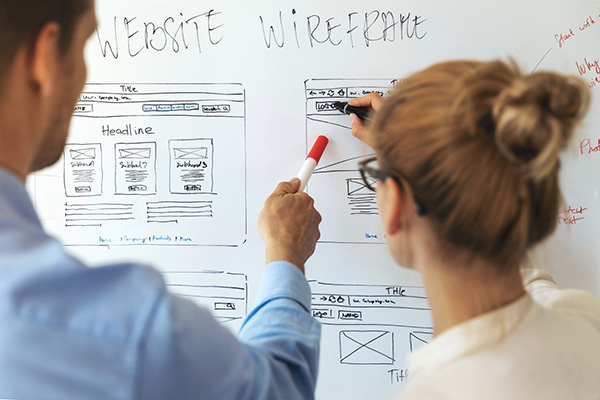 Minimalist website design isn’t just about aesthetics; it offers a range of tangible benefits that can positively impact your website’s performance and user experience. Here’s why embracing simplicity can be a game-changer for your online presence:
1. Improved User Experience
Minimalist websites are easy to navigate, reducing confusion and frustration for visitors. Clean layouts and intuitive interfaces ensure users can quickly find the information they need. This seamless experience encourages longer browsing sessions and increases the likelihood of conversions.
2. Faster Load Times
With fewer elements to load, minimalist websites are inherently faster. This speed not only improves the user experience but also boosts search engine rankings, as page load time is a critical factor for SEO.
3. Enhanced Focus
By eliminating distractions, minimalist design directs attention to key elements like your call-to-action buttons, product highlights, or essential content. This clarity helps guide users toward taking desired actions, whether it’s making a purchase or signing up for a newsletter.
4. Professional Aesthetic
A minimalist website exudes modernity and professionalism. The clean design communicates trustworthiness and credibility, which are crucial for building strong customer relationships and brand loyalty.
5. Easier Maintenance
Fewer design elements mean fewer things to update, making maintenance more straightforward. This simplicity ensures that your website stays functional and visually appealing without constant overhauls.
6. Accessibility and Responsiveness
Minimalist designs adapt well to different screen sizes and devices, providing a consistent experience for all users. This adaptability ensures your website looks and works great, whether it’s viewed on a desktop, tablet, or smartphone.
Minimalist website design isn’t just a style choice; it’s a strategic decision that improves functionality, performance, and engagement. These benefits make it a versatile option for businesses across industries.
Elements of Effective Minimalist Website Design
 Creating an effective minimalist website requires careful planning and execution. While the design may appear simple, every element plays a critical role in the user experience. Here are the core components that define a successful minimalist website design:
1. White Space
White space, also known as negative space, is one of the most defining features of minimalist design. It’s the empty space around elements on a page, giving your content room to breathe. Proper use of white space improves readability, draws attention to key areas, and creates a clean, organized look.
Tip: Use white space to separate sections, highlight important content, and guide users’ attention to calls-to-action.
2. Typography
Typography plays a vital role in minimalist design. Clean, legible fonts enhance readability and ensure your message stands out. Minimalist websites often rely on simple, sans-serif fonts to maintain a modern and uncluttered aesthetic.
Tip: Use a maximum of two font families and focus on consistency in size and spacing.
3. Limited Color Palettes
Minimalist websites often use a limited color palette to maintain visual harmony. Neutral tones, combined with one or two accent colors, keep the design cohesive and draw attention to important elements like buttons or links.
Tip: Choose colors that align with your brand identity and use contrast effectively for readability.
4. Streamlined Navigation
Minimalist design emphasizes simplicity in navigation. A streamlined menu ensures users can easily find what they’re looking for without feeling overwhelmed by too many options.
Tip: Limit navigation to 4-6 essential links and ensure your menu is intuitive across all devices.
5. Visual Hierarchy
Visual hierarchy guides users through your content by emphasizing the most important elements. Through the use of font sizes, colors, and spacing, you can create a natural flow that helps users navigate your site with ease.
Tip: Use headings, subheadings, and bold elements to prioritize content.
6. Functional Imagery
Minimalist websites often use imagery sparingly, focusing on high-quality visuals that serve a clear purpose. Avoid excessive decorations and choose images that enhance your content or support your message.
Tip: Optimize images for web use to maintain fast loading speeds.
By combining these elements, you can create a minimalist website that looks clean, functions efficiently, and provides a seamless experience for your visitors. Each of these components works together to prioritize usability, ensuring your website is as effective as it is visually appealing.
Common Mistakes to Avoid in Minimalist Website Design
 While minimalist website design can create a clean and professional online presence, it’s easy to make mistakes that undermine its effectiveness. Avoid these common pitfalls to ensure your website remains both functional and visually appealing:
1. Over-Simplification
Minimalism is about eliminating unnecessary elements, but overdoing it can make your website feel incomplete or confusing. Removing too many features, like navigation links or key calls-to-action, can frustrate users and hinder their experience.
Solution: Focus on balance—retain essential elements that guide users while removing distractions.
2. Ignoring Mobile Responsiveness
A minimalist design that isn’t optimized for mobile devices can result in a poor user experience. Buttons that are too small or content that doesn’t scale properly can deter mobile users, who make up a significant portion of website traffic.
Solution: Test your design across various devices to ensure it’s responsive and user-friendly.
3. Lack of Visual Hierarchy
In an effort to simplify, some designers overlook the importance of organizing content. Without a clear visual hierarchy, users may struggle to identify key information or know where to focus their attention.
Solution: Use headings, contrasting fonts, and strategic placement of elements to guide users naturally.
4. Poor Use of White Space
While white space is a hallmark of minimalist design, overusing it can make your site feel empty or unengaging. Conversely, not using enough white space can lead to a cluttered look.
Solution: Aim for a balance that highlights important content while maintaining visual harmony.
5. Unreadable Typography
Minimalist designs often use modern, stylish fonts, but choosing a font that is too small or overly decorative can impact readability.
Solution: Opt for clean, legible fonts in appropriate sizes to ensure users can easily read your content.
6. Overlooking SEO Fundamentals
Minimalist design focuses on simplicity, but ignoring SEO elements like metadata, headings, and alt tags can limit your site’s visibility.
Solution: Incorporate SEO best practices without compromising the clean design aesthetic.
7. Focusing Too Much on Aesthetics
A minimalist website may look great, but if it doesn’t meet user needs or align with business goals, it fails its purpose.
Solution: Prioritize functionality alongside aesthetics, ensuring users can achieve their goals efficiently.
By avoiding these mistakes, you can create a minimalist website that is both visually stunning and highly functional. When executed correctly, minimalist design enhances user experience, builds trust, and drives results for your business.
Tips for Designing a Minimalist Website
 Designing a minimalist website requires strategic decisions to balance simplicity, functionality, and aesthetics. Follow these tips to create a clean, effective design that resonates with your audience.
1. Start with a Clear Purpose
Define the primary goal of your website before you start designing. Whether it’s generating leads, showcasing a portfolio, or selling products, this purpose will guide your design decisions.
Tip: Focus on essential features that help achieve your website’s goal and eliminate distractions.
2. Prioritize Content
In minimalist design, content is the star of the show. A strong focus on high-quality, well-organized content ensures visitors find value quickly and easily.
Tip: Structure your content with headings, bullet points, and short paragraphs for better readability.
3. Use High-Impact Visuals Sparingly
Minimalist websites often rely on a few high-quality images to make an impact. Avoid excessive visuals that clutter your site or slow down load times.
Tip: Choose visuals that align with your brand and enhance the user experience.
4. Leverage White Space
White space is a powerful tool in minimalist design. It improves readability, draws attention to key elements, and creates a sense of balance.
Tip: Use white space strategically to separate content and emphasize important areas, like calls-to-action.
5. Simplify Navigation
Keep your navigation menu straightforward and easy to use. Minimalist websites thrive on intuitive design, allowing visitors to find information without frustration.
Tip: Limit menu items to essentials and ensure the navigation bar is accessible on all devices.
6. Focus on Typography
Typography plays a crucial role in minimalist design. A clean and consistent font choice enhances readability and contributes to a cohesive aesthetic.
Tip: Stick to one or two font families and use size and weight variations to create a visual hierarchy.
7. Optimize for Speed and Performance
Minimalist design naturally reduces clutter, but ensure your website is optimized for fast load times. This improves user experience and boosts SEO performance.
Tip: Compress images, use a reliable hosting provider, and minimize code to maintain fast loading speeds.
8. Test and Refine Your Design
Minimalist design is all about balance. Regular testing helps identify areas where users may struggle or where your design could be improved.
Tip: Use tools like heatmaps and A/B testing to evaluate user interactions and make data-driven adjustments.
9. Choose the Right Tools
Some platforms and themes are better suited for minimalist design than others. Research tools that support simplicity without sacrificing functionality.
Tip: Consider using themes like Avada, Astra, or GeneratePress, which prioritize clean layouts and customization.
10. Keep Your Brand in Focus
Minimalism should enhance your brand’s identity, not overshadow it. Maintain consistency with your logo, color palette, and messaging throughout the site.
Tip: Ensure your design choices align with your overall branding strategy to create a cohesive experience.
By following these tips, you can design a minimalist website that combines visual appeal with outstanding performance. The result is a website that not only looks great but also provides a seamless and engaging experience for your visitors.
Examples of Minimalist Website Design
 Seeing minimalist design in action can provide valuable inspiration for your own website. Below are examples of websites that effectively use minimalist principles to create clean, engaging user experiences.
1. Apple
Apple’s website is a gold standard for minimalist design. It uses ample white space, high-quality visuals, and a limited color palette to focus attention on its products. Navigation is simple, and every element serves a purpose.
Key Takeaway: Use white space strategically and let your products or content take center stage.
2. Dropbox
Dropbox’s minimalist homepage uses bold typography, a clean layout, and clear calls to action. The design ensures users understand the service at a glance, with no distractions.
Key Takeaway: Simplify your messaging to make an immediate impact on visitors.
3. Squarespace
Squarespace’s website not only promotes its design tools but also exemplifies them. With a focus on clean visuals and simple navigation, it provides an inspiring example of what minimalist design can achieve.
Key Takeaway: Use high-quality imagery sparingly and keep navigation intuitive.
4. Everlane
Everlane’s eCommerce site highlights its products with minimal text and clean visuals. The design emphasizes transparency and simplicity, aligning perfectly with its brand values.
Key Takeaway: Align your minimalist design with your brand identity to create a cohesive experience.
5. Airbnb
Airbnb uses a minimalist approach to emphasize its search functionality and featured listings. The design ensures users can easily navigate and book accommodations without distractions.
Key Takeaway: Focus on functionality by prioritizing the elements that matter most to your users.
Why These Examples Work
- User-Centric Design: Each website prioritizes user needs, ensuring functionality and simplicity.
- Strategic White Space: Ample white space keeps the design clean and organized.
- Clear Visual Hierarchy: Elements are arranged to guide users through the site effortlessly.
- Consistent Branding: Minimalism enhances, rather than detracts from, each brand’s identity.
By studying these examples, you can identify key features and strategies to implement in your own minimalist website design. Focus on simplicity, functionality, and purpose, and you’ll create a website that stands out for all the right reasons.
How Minimalist Design Impacts SEO
 Minimalist website design doesn’t just look great—it also offers significant advantages for search engine optimization (SEO). A clean, well-structured site makes it easier for search engines to crawl, index, and rank your content. Here’s how minimalist design can boost your SEO efforts:
1. Faster Page Load Times
Minimalist websites typically have fewer elements, which means faster loading speeds. Page load time is a critical ranking factor for search engines and directly impacts user experience.
SEO Benefit: Faster websites rank higher and reduce bounce rates, as visitors are less likely to leave due to slow performance.
Tip: Optimize images, use efficient coding practices, and leverage browser caching to keep your site lightning fast.
2. Improved Mobile Experience
Minimalist designs are highly responsive, making them ideal for mobile users. A clean layout ensures your website looks great and functions well on all devices, meeting Google’s mobile-first indexing requirements.
SEO Benefit: A mobile-friendly site ranks better in search results and appeals to the growing number of mobile users.
Tip: Test your website on various devices to ensure seamless responsiveness.
3. Enhanced Crawlability
Search engines rely on bots to crawl your website. A clutter-free design with simple navigation and a clear structure helps these bots index your pages more efficiently.
SEO Benefit: Improved crawlability increases the chances of your content being ranked accurately.
Tip: Use a straightforward URL structure and ensure internal links are functional and logical.
4. Reduced Bounce Rates
A minimalist design creates a positive user experience by focusing on clarity and functionality. Visitors are more likely to engage with your content, reducing bounce rates and increasing time spent on your site.
SEO Benefit: Lower bounce rates signal to search engines that your content is relevant and valuable, boosting rankings.
Tip: Use clear calls-to-action and engaging content to keep users on your site longer.
5. Better Focus on Keywords
Minimalist designs reduce distractions, allowing your content and keywords to take center stage. This clarity improves the relevance and impact of your on-page SEO strategies.
SEO Benefit: Search engines can more easily determine the focus of your content, leading to better rankings.
Tip: Optimize headings, meta descriptions, and body content with targeted keywords.
6. Enhanced User Experience
Minimalism emphasizes usability, ensuring visitors can navigate your site easily. A positive user experience is a key factor in SEO rankings, as it influences engagement and conversion metrics.
SEO Benefit: Higher engagement rates and conversions indicate to search engines that your site provides value.
Tip: Use intuitive navigation, legible fonts, and a clean layout to improve usability.
By embracing minimalist website design, you not only enhance your site’s aesthetics but also strengthen its SEO performance. The combination of faster load times, better user experience, and improved crawlability ensures your site stands out to both visitors and search engines.
Is Minimalist Website Design Right for Your Business?
 While minimalist website design offers numerous benefits, it’s not a one-size-fits-all solution. Determining whether it’s the right approach for your business depends on several factors, including your goals, industry, and target audience. Here’s how to evaluate if minimalism is the best fit for your website:
1. Understand Your Business Goals
Minimalist design works best when simplicity aligns with your objectives. For instance, if your goal is to provide information or showcase a portfolio, minimalism can enhance clarity and focus. However, if your website requires displaying large amounts of complex data, you may need a more detailed approach.
Ask Yourself:
- Does my website need to prioritize simplicity and ease of navigation?
- Will minimalism enhance or limit my ability to meet my goals?
2. Consider Your Target Audience
Your audience’s preferences and expectations play a significant role in choosing a design style. Minimalist design often appeals to tech-savvy users and those who value clean, modern aesthetics. However, some industries may require more detailed designs to convey professionalism or complexity.
For Example:
- A creative agency may thrive with minimalist design, as it emphasizes visuals and clean layouts.
- An eCommerce site might need to balance minimalism with detailed product pages and filters.
3. Assess Your Industry Needs
Certain industries naturally lend themselves to minimalist design, such as fashion, technology, and creative services. However, others, like healthcare or finance, might require more content-heavy designs to provide necessary information.
Tip: Research competitors in your industry to see if minimalist design is common and effective.
4. Evaluate Your Content
Minimalist design works well for websites with focused, concise content. If your site requires large amounts of text, charts, or other detailed elements, you’ll need to carefully balance simplicity with functionality.
Ask Yourself:
- Can my message be communicated with minimal text and visuals?
- Will reducing design elements enhance or hinder the delivery of my content?
5. Think About Maintenance
Minimalist websites are often easier to maintain due to their streamlined design. If your business lacks the resources for frequent updates or complex maintenance, a minimalist approach may be ideal.
Consider:
- Do I have the resources to manage a content-heavy, intricate website?
- Would a simpler site reduce maintenance time and costs?
6. Prioritize User Experience
At its core, minimalist design aims to improve user experience. If your website’s primary goal is to make navigation seamless and information accessible, minimalism can help you achieve that.
Tip: Gather feedback from current users or conduct usability testing to understand how simplicity could improve your site.
When Minimalism Isn’t the Best Fit
While minimalist design has broad appeal, it’s not always suitable:
- If your audience expects detailed visuals or content.
- If your business relies heavily on showcasing a large product catalog or complex data.
- If your branding doesn’t align with the clean and modern aesthetic.
By evaluating these factors, you can determine if minimalist website design aligns with your business goals and audience needs. When implemented thoughtfully, minimalism can create a professional, effective, and engaging website that drives results.
Simplify to Amplify: Embrace Minimalist Website Design
Minimalist website design offers a powerful approach to creating websites that are clean, functional, and engaging. By focusing on simplicity, this design philosophy enhances user experience, improves performance, and builds trust with your audience. Whether you’re streamlining navigation, optimizing load times, or leveraging white space, minimalism ensures every element on your site has a purpose.
If your business values clarity, speed, and a modern aesthetic, minimalist design could be the perfect fit. It’s not just about looking good—it’s about delivering a seamless experience that keeps visitors engaged and coming back for more.

About the Author
Jason Holicky is the founder of Holicky Corporation, a successful marketing agency in New Lenox, Illinois. With over 25 years of experience, he specializes in marketing consulting, website development, corporate photography, video editing, and social media management. Jason is passionate about helping businesses thrive, generate leads, and stay updated with current marketing methods and technology trends. He is a certified Google Ads expert and AppDirect technology advisor.
Related Posts




Ready to Elevate Your Online Presence? Let’s Get Started!
Take the first step towards a robust online website system with our expert web development services. Whether you’re looking to create a custom website, build a scalable Content Management System, or develop seamless APIs, our team is here to bring your vision to life. Contact us today to discuss your project and discover how our custom solutions can transform your online platform.



